How to Hide a WiFi Security Camera Without Losing Coverage
Most break-ins happen because criminals spot your camera first and figure out how to avoid it. If your security camera is mounted in an obvious spot with a blinking LED and a big white housing, it’s doing half the job it should. Learning how to hide a WiFi security camera properly means your camera works with the element of surprise — and in South Africa, that edge matters. Whether you’re securing a townhouse in Joburg, a flat in Cape Town, or a rural smallholding, a well-hidden camera catches what a visible one scares away.
Why Hiding Your Camera Actually Makes It More Effective
A visible camera deters opportunistic thieves — that part is true. But a determined criminal will simply keep their face down, wear a cap, or find a blind spot. A hidden camera, on the other hand, captures usable footage that can identify suspects and support a case with SAPS or your insurance provider. The two approaches aren’t mutually exclusive — many South African homeowners run one visible dummy or deterrent camera alongside one or two genuinely hidden units.
The key principle is layered security: let one camera scare them off, and let the hidden one record them if they proceed anyway.
The Best Indoor Spots to Hide a WiFi Security Camera
The best indoor hiding spots put the camera at eye level or slightly above, facing the most likely entry point, with a clear sightline and a stable WiFi signal. Avoid corners that are too dark or too far from your router — a hidden camera that drops offline is useless.
Top indoor hiding spots:
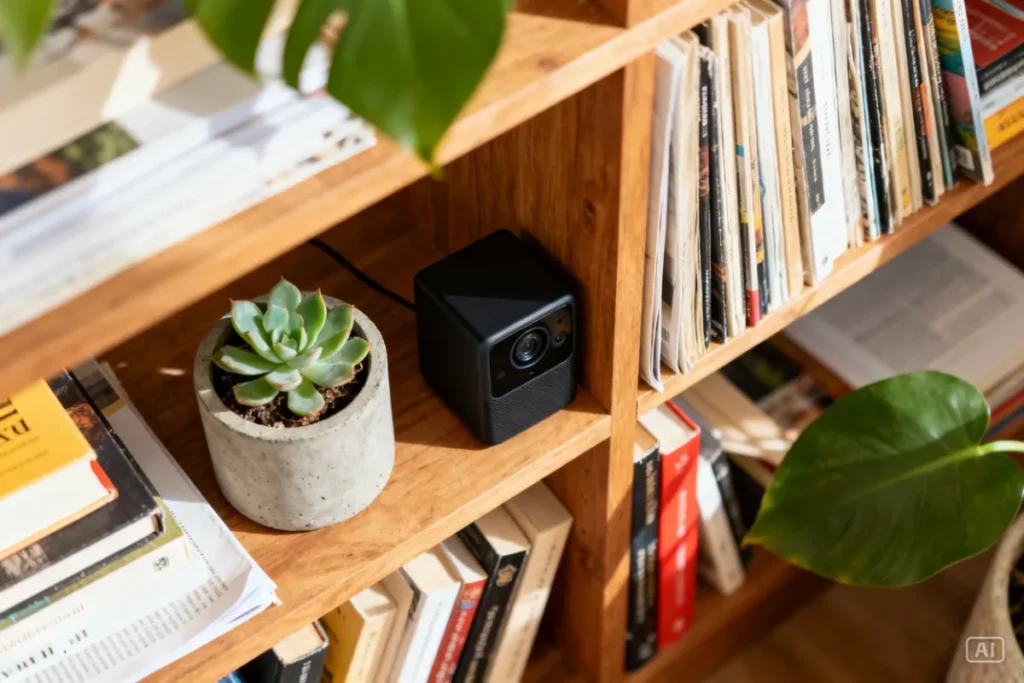
- Bookshelves — tuck the camera between books or ornaments, lens facing outward
- Behind a plant or pot — works well near front doors or lounge areas; use a small pot plant with enough foliage to break the camera’s outline
- Inside a tissue box — a classic DIY trick; cut a small hole, insert a mini WiFi camera
- On top of a TV unit or entertainment centre — blends in with other devices; position it slightly downward
- Smoke detector housing — some cameras are designed to look exactly like smoke detectors; these are purpose-built for discreet installation
- Clock or picture frame — commercially available cameras built into working clocks or frames are available online and blend seamlessly into any room
The goal isn’t to be invisible — it’s to be unrecognisable as a camera.
How to Hide a WiFi Security Camera Outside
Hiding a camera outdoors is trickier because the environment is harsher — heat, dust, and rain are real factors in South Africa. The best outdoor hiding spots keep the camera protected from the elements while still covering your gate, driveway, or garden access points.
Proven outdoor hiding locations:
- Under roof eaves — mount the camera facing down from the underside of your roof; it’s naturally shielded from rain and sun, and not visible from street level
- Inside a fake rock or garden ornament — weatherproof fake rock housings are available and look completely natural in a garden
- Behind a security light — position a small camera just behind or below an existing outdoor light fitting; the light itself draws the eye, not the camera
- Mounted in a tree or dense bush — works well for properties with mature gardens; waterproof the unit properly with a silicone seal
- Above a gate motor housing — the gate motor box gives natural camouflage; most people’s eyes go to the gate itself, not the box above it
For any outdoor hidden camera, you’ll want a unit that’s rated IP65 or higher for dust and water resistance.
Step-by-Step: Setting Up a Hidden WiFi Camera in Under 30 Minutes
You don’t need an installer or an electrician for most small WiFi cameras. Here’s how to get yours running quickly:
- Choose your hiding spot — walk the room or area and identify where an intruder would most likely stand or pass through
- Test your WiFi signal — take your phone to that spot and check signal strength; if it drops below two bars, consider a WiFi extender or a camera with a SIM card slot
- Mount or position the camera — use the included mount, Velcro strips, or a purpose-built housing (bookshelf unit, fake rock, etc.)
- Download the camera’s app — most WiFi cameras use a dedicated app (e.g., YI Home, Reolink, Tuya); follow the in-app pairing instructions
- Connect to your home WiFi — use your 2.4GHz network for most budget cameras; 5GHz is faster but shorter range
- Adjust the angle — use the live view in the app to confirm the frame covers your intended area; tilt slightly downward for better face capture
- Disable the LED indicator light — most apps let you turn off the status LED; do this immediately or cover it with black electrical tape
- Test motion detection — walk through the frame and confirm the app sends a notification; adjust sensitivity to avoid false alerts from pets or wind
The whole process takes 20–30 minutes for a first-timer.
Comparing Hidden Camera Types: Which One Works Best for SA Homes?
| Camera Type | Best For | Hiding Difficulty | Price Range |
|---|---|---|---|
| Mini cube WiFi camera | Shelves, desks, indoor corners | Easy | R300–R800 |
| Fake smoke detector camera | Ceilings, hallways | Very Easy | R400–R900 |
| Clock / frame camera | Living rooms, offices | Very Easy | R500–R1,200 |
| Bullet camera (under eave) | Outdoor, driveway, gate | Moderate | R600–R1,500 |
| Solar WiFi camera | Outdoor, no power point needed | Moderate | R800–R2,000 |
| SIM card mini camera | Remote areas, no WiFi | Easy | R500–R1,200 |
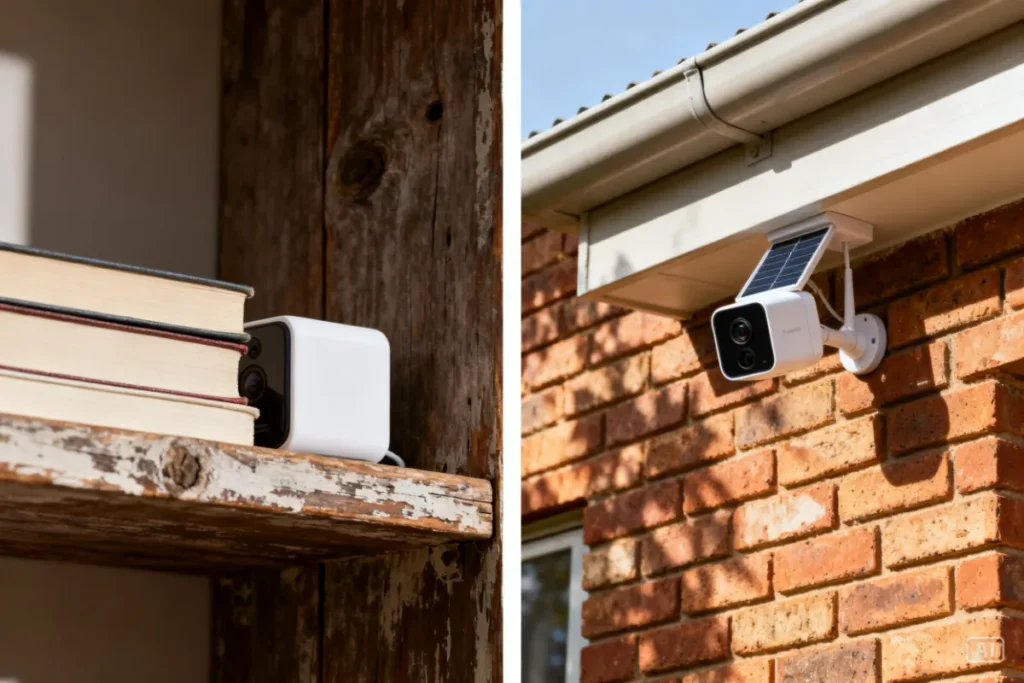
For most South African homes, a mini cube camera indoors + a solar WiFi camera outdoors is the most cost-effective and covert combination.
Common Mistakes People Make When Hiding a Camera
Hiding a camera badly is almost worse than not hiding it at all — you end up with footage that’s blurry, blocked, or useless.
Avoid these mistakes:
- Hiding it too well — if the lens is partially blocked by leaves, fabric, or an ornament, your footage will be blurry or black
- Pointing it at a window — backlighting from a window will wash out faces; position cameras so they face away from windows
- Ignoring the WiFi signal — a camera that keeps going offline due to a weak signal defeats the purpose entirely; if needed
- Leaving the LED on — that little blinking light is a dead giveaway at night; turn it off in the app settings
- Forgetting to check storage — if your camera records to a microSD card, check it monthly; a full card stops recording
Recommended Setup for South African Homes
This is one of the most practical hidden camera setups we’re seeing locally right now — and it works in a flat, townhouse, or freestanding home without any wiring or professional installation. A mini indoor WiFi cube camera paired with a solar-powered outdoor unit gives you full coverage, zero monthly fees (no subscription needed for local storage), and both cameras can be monitored from one app on your phone.
- Simple plug-and-play setup — no electrician required
- Works through load shedding when paired with a solar unit or UPS
- Perfect for renters, townhouse complexes, and small business owners
The Ultimate Guide to Solar Security Cameras in South Africa
Zack’s Verdict
Look, hiding a camera properly takes about 20 extra minutes of thought before you mount it — and that 20 minutes is worth more than R5,000 of equipment placed badly. The criminals operating in South African neighbourhoods right now are not amateurs. They clock your obvious camera, pull a hoodie up, and move on to do whatever they came to do. A hidden unit at the right angle, with the LED off, motion alerts on, and decent microSD storage? That’s what gets faces, plates, and evidence. Don’t mount it high, mount it smart.
FAQ
Q: Is it legal to hide a security camera in South Africa? A: Yes, it’s legal to record on your own property. You cannot legally record in areas where people have a reasonable expectation of privacy (like a bathroom), and recording audio without consent has stricter rules. For general home and business security, hidden cameras on your premises are legal.
Q: Can I hide a WiFi camera without drilling holes? A: Absolutely. Most mini cube cameras can be positioned on a shelf, inside a housing, or held in place with Command strips or Velcro. No drilling required for indoor setups.
Q: How do I stop the LED light from giving away my hidden camera? A: Go into your camera’s app settings — look for “LED indicator” or “status light” and toggle it off. If your camera doesn’t have this option, a small piece of black electrical tape over the LED works perfectly.
Q: What’s the best camera app for monitoring hidden cameras in SA? A: Most budget WiFi cameras use the Tuya Smart or YI Home app. Reolink has its own solid app. All of them work on Android and iOS and allow remote monitoring over data or WiFi.
Q: Will load shedding affect my hidden camera? A: A standard plug-in WiFi camera will go offline during load shedding. To keep coverage during outages, use a solar camera outdoors or connect your indoor camera to a small UPS (uninterruptible power supply).
Q: How far away can a hidden WiFi camera see clearly? A: Most budget cameras have a clear daytime range of 5–10 metres and night vision range of 3–8 metres. For larger spaces like a warehouse or big garden, choose a camera rated for longer range.
Q: Can I hide a camera outside without a power point? A: Yes — solar WiFi cameras are designed exactly for this. They charge via a small solar panel and store power in a built-in battery, making them completely wire-free and ideal for gates, outbuildings, and remote corners of a property.
Conclusion
Hiding a WiFi security camera the right way doesn’t require expensive equipment or a professional installer. It requires smart placement, a few minutes in your camera’s app, and a bit of common sense about angles and lighting. South African homes face real, daily security threats — and a properly hidden camera gives you the evidence you need when something goes wrong. Browse the WiFi and solar camera range at Zacks Bargains for affordable options that work straight out of the box, no complicated setup required.